New Version 26.9: Auto Duck and Adjustment Clip
Version 26.9.27 is now available for DOWNLOAD!
Security Notice
All users are encouraged to upgrade. This release fixes flaws in Shotcut’s network downloads:
- A failed HTTPS fetch was retried over cleartext HTTP.
- Shotcut offered to ignore certificate errors.
- An upgrade URL was accepted from a host other than shotcut.org.
- A Whisper model was kept even when its SHA-256 did not match the digest shipped with Shotcut.
- Refresh Models loaded a downloaded descriptor as QML.
These are fixed in this version. A GitHub security advisory is published and a CVE identifier will be added soon.
New Look
- New logo!
Head over to our Press Media Kit page to get various images and color codes for articles/videos.
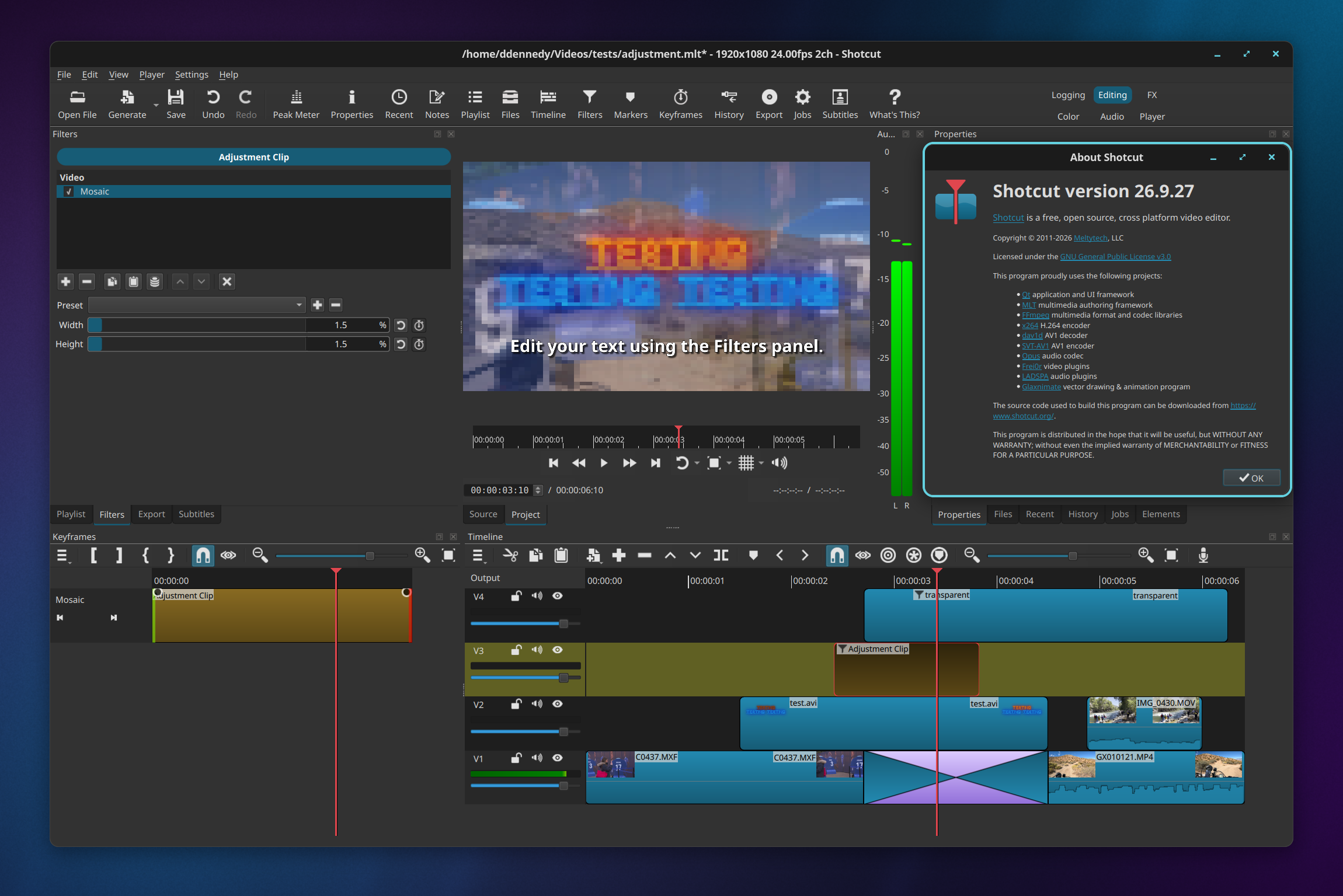
- Improved the appearance of the user interface to be more modern with rounded corners in many places.
Audio Enhancements
- Added Automatic Audio Ducking to the Properties of an audio timeline track.
- Added a volume control and audio level meter to Timeline track headers. This makes the track header column a mixing console without adding a new panel. The gain filter this adds to the track is keyframable.
- Improved audio quality by removing a conversion to 16-bit integer and keeping the pipeline in 32-bit float.
- Changed Adjust Clip Gain for timeline clips to require Ctrl+Alt (option+command on macOS) to drag. This avoids inadvertent changes while selecting and dragging clips, so that option defaults on again. A tooltip was also added to the clip’s audio line.
Timeline Enhancements
- Added Timeline > Generate > Adjustment Clip. This is a dummy video clip that contributes no video. Its filters apply to the composite of all video tracks below it.
- Improved Timeline performance when moving clips to another track, zooming, and undoing many operations (except ripple move and trim).
Other Changes
- Changed Settings > Leave Safe Mode to an always-present Allow External Plugins checkbox that defaults to off. This helps prevent some VST2 plugins on Windows and macOS from causing startup and shutdown (including export) problems.
- Detect a stuck application startup and automatically disable external plugins.
- Added a context menu with Copy to the Missing Files dialog and View > Resources.
- Upgraded FFmpeg to version 9.0.
Fixes
- Fixed Mask: Draw (Glaxnimate) filter, Operation > Subtract, for 8-bit processing mode (broke in version 25.12).
- Fixed using Size, Position & Rotate with Mask: Apply filters (broke in version 25.12).
- Fixed LV2 external audio plugins not loading on Windows (unless
LV2_PATHis set explicitly). - Fixed opening a project on a mounted CIFS/SMB share on Linux kernel 7.1 and above.
- Fixed the VA-API HEVC hardware encoder on Linux.
- Fixed Show in Folder not working with non-ASCII characters on Linux.
- Fixed Import Subtitles from File not working on Windows.
- Fixed a redundant context menu on text edit controls in filters on Windows (broke in v26.8).
- Fixed Subtitles showing an incorrect duration (broke in version 26.8).
- Fixed moving a Timeline clip next to another with snap while zoomed out possibly inserting 1 blank frame.
- Fixed copying and pasting a Timeline transition corrupting audio in the pasted transition.
- Fixed the window title bar missing on Linux with Settings > Display Method > Vulkan.
- Fixed a marker being unexpectedly deleted when moving a clip to the left with Ripple Markers on.
- Fixed keyframes on Timeline > Split after a transition.
- Fixed an Export job possibly reporting failure even though the file was completed successfully.
- Fixed some buffer overflow security issues in PGM and wipe reading in MLT and in Set Equirectangular.
- Hardened MP4 parsing in Properties > Set Equirectangular and the export job context menu.
- Fixed projects deleted from disk still appearing in Projects.
- Fixed Ctrl+Up and Ctrl+Down not changing the current track when Timeline loses focus.
- Fixed Player > External Monitor > DeckLink (and related devices such as UltraStudio) HDMI/SDI possibly deadlocking.
- Fixed a nested MLT XML clip’s length (duration) not updating. It now updates when selected, but still needs a manual trim to increase the clip.
- Fixed a possible crash when trying to add a subtitle item in the last half second of the timeline.
New Version 26.8: Elements 🔥
Version 26.8.1 is now available for DOWNLOAD!
Elements Panel
Added Elements panel to the File > New and View menus and the Generate buttons. This is a very slim (22MB) stock asset library: emoji stickers, sounds, overlay transitions, animated text, graphics. The content licenses are royalty free, including commercial, and do not require attribution:
- Emojis: Open Font License 1.1
- Sounds: The Sonniss #GameAudioGDC Bundle Licensing Agreement
- Text, Transitions, Graphics: Lottie Simple License
Changes
- Added Settings > Graphics Adapter for Windows and Linux (only if multiple GPUs).
- Added Shake video filter. First generated UI to be shared and officially adopted.
- The
--experimentalUI generator now also generates ameta.qml. (See View > Application Log to get the temp file names to copy and share these files.) - Improved appearance of tabs and Subtitles in Fusion Dark and Fusion Light themes.
Fixes
- Fixed opening a
.mltproject file from a file manager on macOS (broke in v26.6). - Fixed corrupt color in dissolve transitions with Settings > Processing Mode > Linear 10-bit CPU.
- Fixed the new Reduce Noise: Audio (RNNoise) when the export audio sample rate is not 48000 Hz.
- Fixed off-by-one frame errors in subtitle bar in Timeline and Subtitle Burn In video filter.
- Fixed all builds missing support for VST2 and LV2 audio plugins. Now install and try the Valhalla Supermassive VST plugin.
- Fixed a
libGLESv2.dllwarning on startup on some Windows systems. - Fixed Motion Tracker keyframes not applying after save/reload.
- Fixed manual override
QSG_RHI_BACKENDenvironment variable on Windows. - Fixed Properties > Convert & View > Resources > Convert to keep 10-bit video as 10-bit when using 10-bit processing modes.
- Fixed the Crop: Source filter with Preview Scaling and hardware decoder.
- Fixed proxy video generated for rotated video (Properties > Rotation) not preserving rotation.
New Release 26.7.30
New Version 26.6: High Dynamic Range
Version 26.6.25 is now available for DOWNLOAD!
External Monitor with a System Display
Three years ago, when we upgraded our UI library to a major new version, we lost support for using an additional system display as an external monitor. Many people were disappointed to lose that feature. Now, after a major change to the video plumbing, it is back!
The External Monitor submenu is moved from Settings to the top of the Player menu. It is incompatible with newly added Settings > Player > Use Old Video Output (provided just in case the new plumbing does not work).
The new plumbing also provides a way to preview HDR video except, for technology reasons, it must be shown in a separate window…
HDR Video Preview and Export
As a quick reminder for those unfamiliar: “HDR” means high dynamic range, not high definition resolution. It is about expanded color and light. A lot of phones and cameras are recording with this today, and many people are not aware until they try to edit and run into problems. Also, HDR game captures on computers is increasingly common. A year ago, we added very limited, hidden support for editing HDR video because, basically, we had no way to display it without a device from Blackmagic Design. Now, there is a way.
- Added Player > External Monitor > Preview Window (HDR) that can be made fullscreen.
- It also works for SDR.
- HDR requires a display properly configured with HDR, Native 10-bit CPU or Linear 10-bit GPU/CPU processing modes, and HDR video sources.
- For HDR, only use filters tagged with
#gpuor#10bit. - It does not appear to work on Linux, at least I have not been able to get it working.
- Switching between PQ HDR (HDR10) and HLG HDR requires restarting the app.
- The default shortcut to open or raise the preview window is Ctrl+`. It does not toggle between open and close because raise is more convenient.
- You can move the window by clicking anywhere inside except the controls bar and dragging.
- F toggles fullscreen and Esc also leaves fullscreen.
- Incompatible with Use Old Video Output.
- Added Dynamic range to custom Video Mode and Timeline Properties.
This offers SDR, which follows the colorspace, HLG HDR, and PQ HDR. - At this time, Shotcut only supports converting log profile video to HDR with GPU processing mode and HLG HDR video mode. And it cannot convert between HDR formats or combine multiple HDR formats within a project.
- Added support for PQ HDR (HDR10) to External Monitor > DeckLink.
- Added support for HDR to Export (based on Video Mode and 10-bit processing mode).
- Added HDR10 metadata dialogs for External Monitor > DeckLink and Export > Codec.
Export only embeds HDR10 metadata for thelibx265andlibsvtav1video codecs and no hardware encoders. - TODO: Properties > Convert and View > Resources > Convert do not support 10-bit yet; that will be added in the next release.
External Plugins
We added limited support for external audio and video plugins.
“Limited” means it does not support a plugin’s included UI, and our UI generator is new and experimental. That means you can only try it if you are an advanced user who knows how to supply a command line option to reveal the new UI generator. There are many mysterious effects, and uncertainty if things are working correctly. As a result, the user experience is not yet good enough with an increased risk of crash.
“External” means both effects included with Shotcut but not yet available in the UI or plugins that you install yourself to the standard, expected location for your OS.
OpenFX Image Effect Plugins
- Added a UI (
--experimentalnot required) for NTSC-rs. - Limited compatibility: not available, seems to do nothing, or makes the video black.
- No support for plugins that operate temporally or require multiple image/video inputs.
- No support for generators, transitions, or retimers.
- No support for the UI embedded in the plugin.
- No support for GPU technologies but multi-threaded CPU does work.
- Very limited testing. There are many plugins we have not tested especially commercial ones, and we know there are some that do not work.
- None are included with Shotcut.
-
Looks for plugins in the standard folder for the operating system.
Linux /usr/OFX/Plugins/usr/local/OFX/PluginsmacOS /Library/OFX/Plugins~/Library/OFX/PluginsWindows C:\Program Files\Common Files\OFX\Plugins
VST2 and LV2 Audio Plugins
- Added a UI for Valhalla Supermassive.
- No support for the UI embedded in the plugin.
- No support for instruments.
- Very limited testing.
- None are included with Shotcut.
-
Looks for plugins in the standard folder for the operating system.
Linux /usr/local/lib/vst/usr/lib/vst/usr/lib64/vstmacOS /Library/Audio/Plug-Ins/VST~/Library/Audio/Plug-Ins/VSTWindows C:\Program Files\Common Files\VST2C:\Program Files\VSTPluginsC:\Program Files (x86)\Common Files\VST2C:\Program Files (x86)\VSTPlugins
Safe Mode and UI Generator
- Added menu item Settings > Leave Safe Mode.
This appears if Shotcut crashes within 30 seconds upon startup, which restarts in a safe mode without external (OpenFX, VST2, LV2) plugins. - Added
--experimentalcommand line option to try out the filter UI generator. This provides a Manage Add-on Filters dialog to search for effects included with Shotcut or external plugins. After choosing some to add-on, they become available in the regular Filters menu in the current as well as future sessions.
Other New Features
- Added Reduce Noise: Audio (RNNoise) filter. More info about RNNoise
- Added Settings > Display Method > Vulkan on Linux.
- Added Settings > Timeline > Create Transitions on Overlap to disable that feature.
- Added support for the
.lotfilename extension for Lottie animation handled by Glaxnimate. - Added support to load custom filter UIs installed to App Data Directory >
extensions>filters. If someone shares a custom or generated UI for an external effect/plugin that seems useful and safe, you can install it here to use it in your Shotcut without needing to use the--experimentalmode. This can also be a place to add custom general purpose scripts by making a dummy filter. Usemlt_service: 'shape'as the dummy/no-op backend filter in themeta.qml. Soon we will add a proper scripts panel. - Documented a scripting interface.
Changes
- Changed Linux Snap to use a desktop environment file dialog if possible.
- Changed the new Log Event shortcut to
Shift+Dbecause one conflicted with Remove Subtitle Item. - Moved Declick Audio from the Time category to Audio in the filter menu.
- Upgraded MLT to version 7.40.0
- Upgraded FFmpeg to version 8.1.2
- Upgraded libspatialaudio to 0.4.0
- Upgraded frei0r to version 3.2.2
Fixes
- Fixed the Font style from the font dialog is overwritten on filter UI reload on Windows (broke in v26.4).
- Fixed hardware scaler on Windows when using Settings > Preview Scaling > Use Hardware Decoder (broke in v26.4).
- Fixed mouse wheel and keyboard not incrementing/decrementing numeric fields in filter UIs (broke in version 26.4).
- Fixed moving clips may create a very long gap.
- Fixed Player > External Monitor > DeckLink (and related such as UltraStudio) HDMI/SDI may deadlock.
- Fixed export with
libopusaudio codec warns aboutframe_duration. - Fixed incorrect current track after moving clip to another track.
- Fixed undo after changing Video Mode corrupts the timeline.
- Fixed double-clicking a project file in Finder with Shotcut already running on macOS.
- Fixed zooming in the player with non-square pixels.
- Fixed a possible crash when Text: Rich filter is first in the list and playhead is not over selected clip.
- Fixed File > Export EDL adds 1-frame clip before transitions.
- Fixed full-width spaces replaced by half-width spaces in Import Subtitles From File.
- Fixed Text: Typewriter not animating correctly after changing rate parameters.
- Fixed reordering Filters breaking selecting another filter.
- Fixed some actions disabled after deleting, moving, or updating an item in Subtitles.
- Fixed repeated prompts to convert a project to GPU processing mode if project was started before version 25.12.
- Fixed skim not working over Timeline clips.
- Fixed mouse wheel not scrolling a filter’s UI within Filters.
- Fixed 10-bit H.264 encoder fails with hardware encoding on.
No H.264 hardware encoders support 10-bit; this change simply makes it use software encoding with x264. - Fixed Export > Ogg Vorbis with Cover Art fails (no longer fails but our Ogg integration does not support cover art).
- Fixed Export > From > Marker using the Reframe output video filter with keyframes.
- Fixed some toolbar icons’ tooltips not showing keyboard shortcut.
- Fixed Zoom Timeline to Fit may not scroll to start.
- Fixed a crash using some Markers actions with nothing open.
- Fixed using Windows UNC paths with filters, e.g. GPS Graphic.
- Fixed extended/special characters in metadata of custom Export preset.
- Fixed Rebuild Audio Waveform was not saving on Windows.
- Fixed tab focus did not allow editing numeric fields in filters.
- Fixed Export > Video > Aspect ratio can be incorrect if very close to a common ratio: 4:3, 16:9, or 9:16.
- Fixed changing many things in Properties enabled Filters that were disabled.
- Fixed crash in Text: Rich filter on some Linux/Wayland versions.
- Fixed toggling visibility of other tracks in Timeline could make an audio clip with an image appear on top.
New Version 26.4: All the Small Things
Version 26.4.30 is now available for DOWNLOAD!
Timeline Improvements
- Added symmetric resize of a timeline transition using its trim handles.
- Added drag-n-drop from Recent to Timeline.
- Improved Timeline and Keyframes zoom to be less erratic and more focused.
- Reduced memory usage for timeline waveforms.
- Changed Timeline > Set Current Track Above and Set Current Track Below to use the bare Up and Down keys.
Speech to Text
- Added Vulkan GPU support to Speech to Text on Windows and Linux.
- Added a Use GPU checkbox to the Speech to Text dialog.
Other New Features
- Added Export > Metadata including Cover art.
- Added a Typewriter group of options to the Burn In Subtitle filter.
- Added job progress and status on the taskbar or dock icon where supported.
- Added Properties > LUT file for video clips, primarily for the Linear 10-bit processing mode.
- Added aspect ratio grid options to the player grid button:
- 1:1 Frame
- 16:9 Frame
- 4:3 Frame
- 9:16 Frame
- Added 10-bit VP9 MP4 (E-AC-3) and 10-bit VP9 WebM (Opus) export presets.
- Added launching Glaxnimate from the Microsoft Store on Windows if available.
Changes
- Stopped bundling Glaxnimate except in the Linux Flatpak.
- Changed audio transition to a constant power crossfade.
- Changed multi-select for Subtitles to use the Shift key.
- Changed Properties timeline duration to be editable.
- Changed opening an image to not start playback.
- Changed Export to default to 10-bit HEVC export in the 10-bit processing modes.
- Changed Timeline > Record Audio to use FLAC instead of Opus for improved quality and tool compatibility.
- Reorganized the Video Mode menu with new categories:
- Social Media
- Other
- Legacy
- Reduced the thickness of the panel splitters and made them brighter.
- Upgraded FFmpeg to version 8.1.
- Upgraded x265 to version 4.1.
- Upgraded whisper.cpp to version 1.8.3.
- Upgraded MLT to version 7.38.0.
- Upgraded Qt to version 6.10.3 on Linux.
Fixes
- Fixed intermittent audio waveform sync or blank waveforms (broke in v26.2).
- Fixed incorrect last frame in Glaxnimate animations.
- Fixed Font style other than weight and italics/oblique in the font dialog.
- Fixed accepting file names with special characters in Playlist > Add Files.
- Fixed markers disappearing after undo moving clips.
- Fixed hourly backup not working when saving frequently.
- Fixed opening a project starts the player at the second frame.
- Fixed seeking with keyboard in Timeline sometimes not working.
- Fixed Settings > Time Format not immediately updating the Timeline and Keyframes rulers.
- Fixed Timeline > Copy, Cut, Paste, and Overwrite breaking grouped clips.
- Fixed keyframes after undoing a trim in.
- Fixed changing Properties > Duration dropping time filters.
- Fixed Edit Marker duration and Ripple Markers off by one frame.
- Fixed the Nervous video filter doing a 2 frame fade-in from black.
- Fixed undo history for lock, mute, and hide track.
- Fixed button menus not opening reliably on Wayland on Linux.
- Fixed a possible crash during voice preview in the Text to Speech dialog.
Search
Recent Posts
- Posted on 27 Sep 2026
- Posted on 01 Aug 2026
- Posted on 25 Jun 2026
- Posted on 29 Apr 2026